Configure the IdentityVault
The IdentityVault holds identifying information separately, so that the central application works with pseudonyms.
Requires: An administration account with Adminmode active. Configuring a vault for a group additionally requires edit access to that group.
- Open the user menu and select IdentityVault.
- Enter the address of your IdentityVault under URL.
- Select Connect.
- Check that the page reports connected and online.
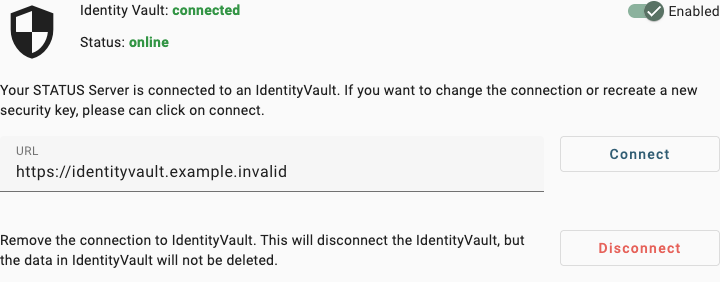
Synthetic connection showing the connected state, the stored address and the disconnect warning.
To give one group its own vault instead, open Groups, select the group, open Advanced settings, enter the URL in the IdentityVault section and select Connect. The group list then shows a shield icon for that group.
Which vault a person uses
The application resolves one vault per person, in this order:
- A group the person belongs to that has its own vault address.
- Otherwise the instance-wide default.
There is no setting per person. If someone belongs to several groups that each have their own vault, exactly one of them is used, and which one is not configurable. Avoid overlapping configurations: give a person only one group with its own vault.
Consequences
- Connect does more than store an address. It establishes a new security key with the IdentityVault and replaces any existing pairing.
- Disconnect removes the connection. Data already held in the IdentityVault is not deleted.
- While the vault is unreachable, identifying information for the affected people can neither be viewed nor edited. The rest of the application continues to work with pseudonyms.
- The field Status IdentityVault URL under Global Settings → Security changes the stored address only; it does not establish the connection. Use the IdentityVault screen for connecting.
- Hospital information system settings belong to a single IdentityVault and appear only for the instance-wide default, not for a group's vault.
- Enabled controls the connection in your own browser session only. It does not change the configuration for anyone else.
Related
- Security and privacy.
- Data processing and hosting.
- Create and use groups.
- Conditions and actions for the HL7 ADT event condition.