Configure person presets
Person presets supply defaults when a new person is created.
Requires: Administration access to Instance Settings. Applying a preset requires permission to create people and, for a group owner, appropriate group membership.
- Open Instance Settings → Agreements & Defaults.
- Under Person Presets, select Add Preset.
- Enter a Preset Name.
- Configure tags, the optional field, pseudonymization and Owner of created person as needed.
- Under Show input fields, choose which fields the creation form should show.
- Wait for All changes saved.
- Open Create person, select the preset and inspect the resulting form using synthetic data.
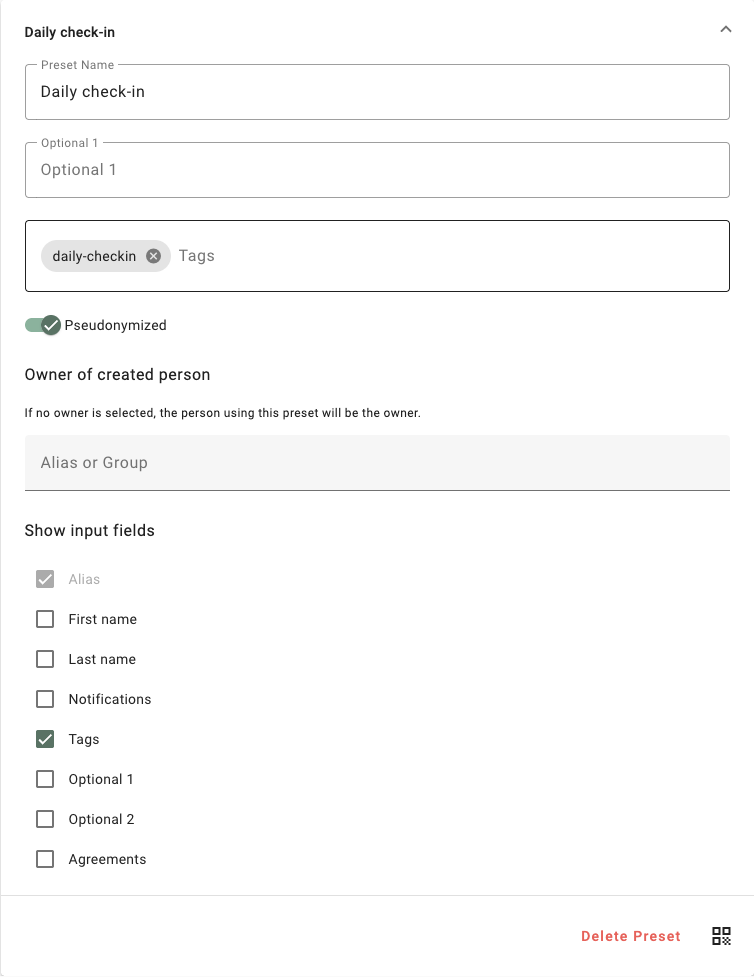
Synthetic preset with no fixed owner and the Tags input field visible.
Defaults and consequences
- If no owner is selected, the person using the preset becomes the created person's owner.
- Presets owned by a group are filtered according to the creating user's group membership.
- Tags and configured defaults are copied when the person is created. Changing a preset does not retroactively update existing people.
- Visibility settings can hide names, notification options, tags, optional fields and agreements. Alias remains part of the form.
- Restricting custom person creation makes ordinary users choose an allowed preset. Ensure the intended users can see one first.
- A preset QR code creates a new person on each scan. It is not the connection code for an existing person.
Use tags with an automation
Give a practice preset the tag daily-checkin. Configure an automation with Person created and the matching tag condition, then assign the intended questionnaire.
The preset supplies data; the automation performs the assignment. Test both together and inspect the person's resulting assignments before using the preset routinely.