Create a calculation
Add a named pipeline to a questionnaire, then verify it against a known synthetic submission.
Requires: Write access to the questionnaire, editing enabled, and read access to a suitable test submission.
- Open the questionnaire and its Calculations tab.
- Select Add Calculation and enter a unique Name, for example
checkin_mean. - Select Add Operator and choose
AVERAGE. - Select the numeric references for the questions to include. Leave Per item off for one overall mean.
- Save the questionnaire.
- Submit a synthetic answer if none exists. For three values
2, 4, 6, expect4. - Select Test calculation and inspect Results.
Testing uses the latest available answer for that questionnaire that you can access, which may belong to someone else. Confirm the source submission first and use synthetic data.
Use the input selector for questions, prior operator results or earlier calculations. Select reference can add an input from another questionnaire; it uses the person's latest complete source answer.
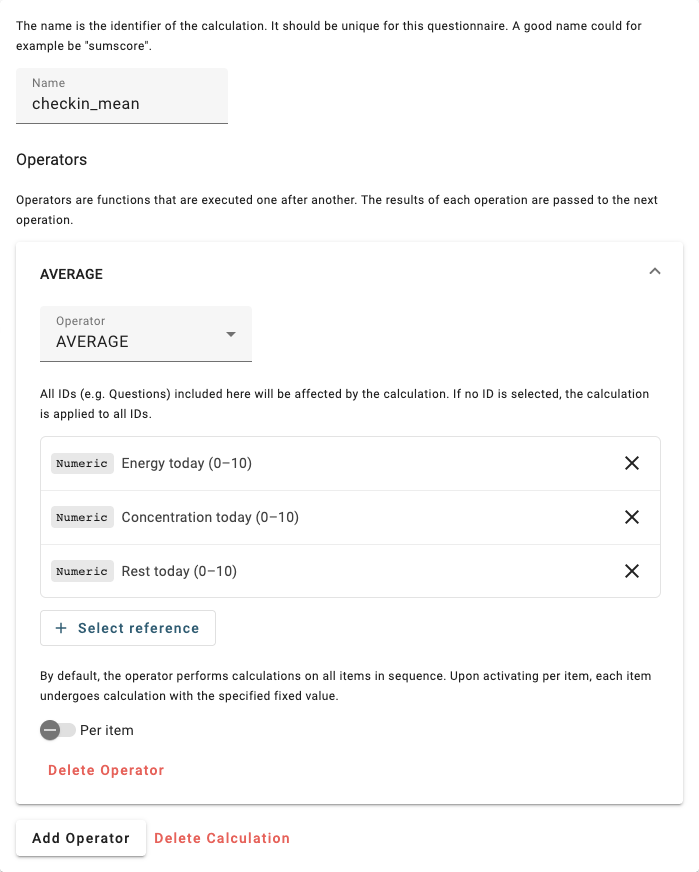
Synthetic checkin_mean pipeline, with its three question inputs selected.
Change existing calculations
Save and test the change before applying it to historical data. Update past results recalculates past answers; the UI warns that this cannot be undone. Incomplete answers may be skipped. Wait for the completion message and review its counts.
If dashboards depend on the calculation's name, retain that name or update the panels that refer to it.