Give read or write access
Access rights control who can read or edit a resource, directly or through a group.
Requires: Write access to the resource to change its access rights.
- Open the person, group, questionnaire, dashboard or automation.
- Open Access Rights.
- Search Alias or Group and select the intended recipient.
- Select Read for viewing or Edit for writing.
- Select Add and confirm the entry appears. Close with OK.
Changes in this dialog are saved as they are applied. Edit includes reading and allows changing resource permissions; grant it only when editing is intended.
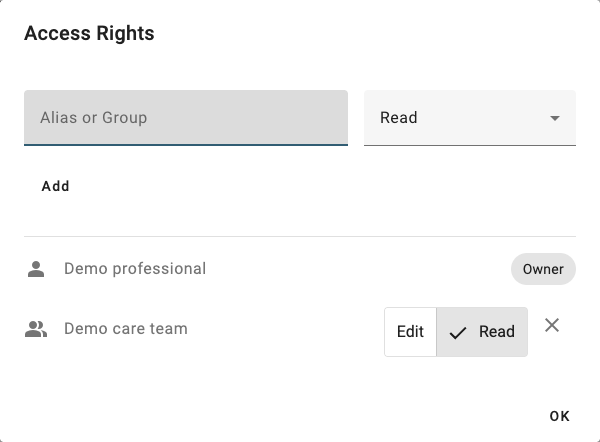
The synthetic care team can read this questionnaire; it has not been granted Edit access.
What else becomes accessible?
Access can come from ownership, direct grants, group membership and resource relationships. For example, access to a person can provide access to their answers and assignments; access to a questionnaire includes its questions.
A shared dashboard does not by itself grant every viewer access to all data it displays. Check the intended viewer's person/answer access too.
To remove a grant, use its delete control. If access remains, inspect group membership and other grants rather than adding a contradictory entry. There is no separate “deny” step in this workflow.