Set a start dashboard
A start dashboard replaces the people search as the first screen a group's members see after signing in.
Requires: An administration account with Adminmode active, and edit access to the group.
Before you start
Prepare the dashboard first, otherwise members reach an empty screen:
- Open the dashboard and give the group Read access.
- Open Groups, select the group, open Advanced settings and enable Dashboard Data Access for it.
Without the access grant members are sent back to the people list. Without data access the dashboard opens but its panels stay empty.
Set the dashboard
- Open Groups and select the group.
- Open Advanced settings.
- Switch on Dashboard as startpage.
- Select the dashboard in the Dashboard search field.
- Select Save.
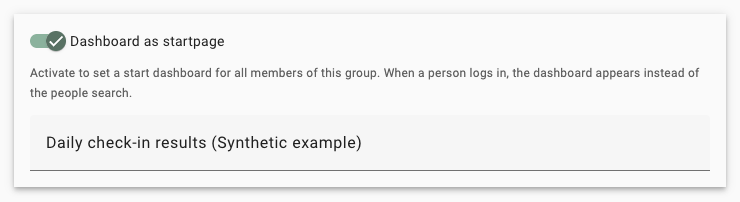
Synthetic group with the start dashboard switched on and a dashboard selected.
The group list then shows a dashboard icon for that group.
Consequences
- The switch alone is not stored until you select Save. Choosing a dashboard in the search field is stored immediately.
- Members see the dashboard in read-only form. They open it again through the instance logo at the top left; there is no separate navigation entry for it.
- A change takes effect the next time a member reloads the application or signs in, not while they are working.
- If a person belongs to several groups that each define a start dashboard, exactly one configuration applies and which one is not configurable. Give a person only one group with a start dashboard.
- The same dashboard can show different numbers to different members, because the data a panel may use follows each member's own group access.
- There is no instance-wide and no personal start dashboard. The setting always belongs to a group.
When members do not see the dashboard
Members are returned to the people list without an error message when the start dashboard cannot be shown. Check in this order:
- Dashboard as startpage is switched on for a group the person belongs to, and the change was saved.
- A dashboard is selected in the search field.
- The dashboard still exists and was not deleted.
- The group has Read access to that dashboard.
If the dashboard opens but stays empty, check the panel itself and confirm Dashboard Data Access for the group.