Set up a group chat
A group chat gives the members of one group a shared room in which they appear under a self-chosen alias.
Requires: Edit access to the group. Administration rights are not needed.
- Open Groups and select the group.
- Open the Chat tab and select Set up chat for group.
- Enter a Chat title.
- Under Time slots, select Add time slot and configure when the chat is open.
- Under Message retention, set Days.
- Under Join links & invitations, select Send invitation by email to all.
- Check that the tab reports Active during a configured time slot.
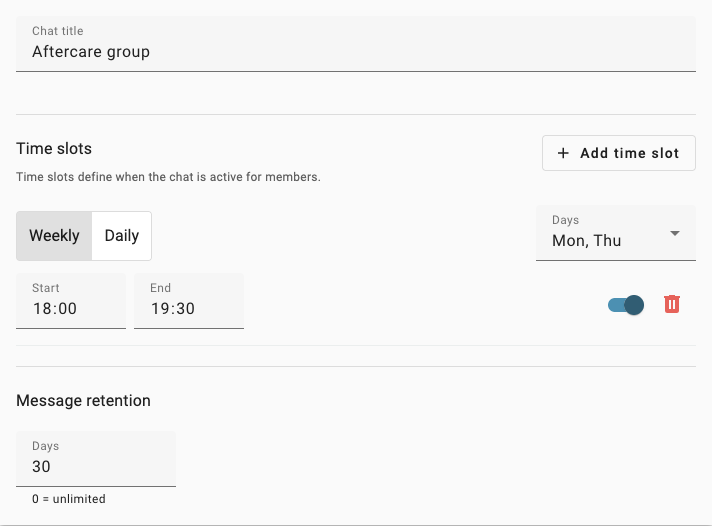
Synthetic chat settings with one weekly time slot and a 30-day retention period.
One chat belongs to exactly one group; its members are the group's members. Add or remove participants under General Info, not in the chat.
Opening hours
A time slot is Daily or Weekly, with Days, Start and End. Slots that run past midnight are allowed.
Without a time slot the chat is permanently inactive, as the tab states: No time slot configured — chat is permanently inactive. Opening and closing is evaluated about once a minute, so a change takes effect shortly after you save it.
When a chat opens, every member is emailed a fresh join link automatically.
Invitations and joining
Each member has an individual join link, available as an email or a QR code through Link & QR. The link contains a sign-in token with a limited lifetime; treat it as a credential and deliver it only to the intended person.
Invitation emails are currently sent in German, whatever language the rest of the interface uses.
What participants can do
On first entry a participant chooses a Chat alias, which must be unique within the group and is shown instead of their name. Participants can write messages, reply to a message with a quoted preview, insert emoji, and see who is typing or online.
The chat deliberately does not offer: file attachments, reactions, read receipts, mentions, editing a sent message, message search, push notifications or archiving. It runs in the browser; the mobile apps do not include it.
Moderation and retention
- Deleting a single message leaves a Message deleted placeholder and records who deleted it.
- Hide history for participants hides everything written so far from participants. Administrators still see it.
- Permanently delete all messages cannot be undone and leaves no record of what was removed.
- Message retention removes messages older than the configured number of Days;
0keeps them indefinitely. The cleanup runs once a night. - Removing a member from the group also removes their access to the chat.
Security
- Messages carry the self-chosen alias. Names and contact details stay in the IdentityVault and do not enter the chat.
- Membership and edit access are checked on the server for every action, including joining the live connection, not only in the interface.
- Outside the configured time slots the server refuses to deliver or accept messages for participants.
- Messages are encrypted in transit.
- Stored invitation records have the join link removed, so the token is not retained after sending.
Messages are not end-to-end encrypted. They are stored in readable form and are available to whoever administers your installation, so treat the chat as internal correspondence rather than a confidential channel.